Multi-factor authentication (MFA)
Last updated 29 May 2026
Multi-factor authentication (MFA) adds a second check after you enter your password. Once you've signed in with your email and password, gliding.net.nz sends a six-digit code to your email address. You must enter that code to complete sign-in.
This protects your account even if someone else has your password — they can't get in without also having access to your email.
MFA is currently being rolled out gradually to a small group of test users before it's enabled for everyone. If you aren't prompted for a code yet, you will be once the rollout reaches your account.
Step 1 — Sign in with your email and password
Go to https://gliding.net.nz and sign in as usual. If your account has MFA enabled, you'll be taken to the verification step automatically after your password is accepted.
Step 2 — Check your email for a verification code
A six-digit code will arrive in your inbox from gliding.net.nz shortly after you sign in. The subject line is Your verification code for Gliding New Zealand.
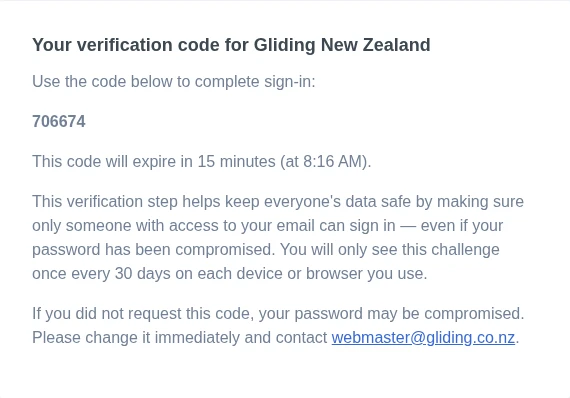
The code expires in 15 minutes. If it expires before you use it, click Didn't receive a code? Send a new one. on the verification page to get a fresh one.
Step 3 — Enter the verification code
On the Two Factor Verification page, type the six-digit code from your email into the Verification Code field and click Verify.
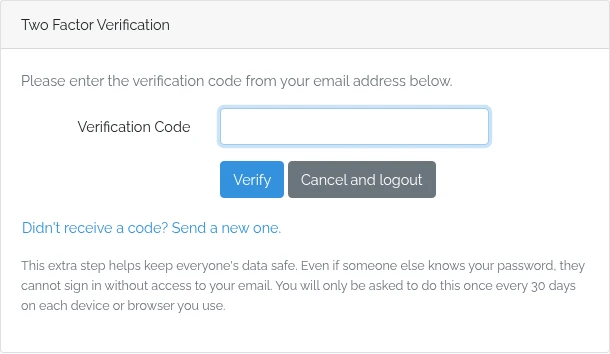
If you entered the code correctly, you'll be signed in straight away.
If you need to cancel, click Cancel and logout — this signs you out so you can start again.
Trusted devices — you won't be asked every time
Once you've verified successfully on a device or browser, gliding.net.nz remembers it for 30 days. You won't be asked for a code again on the same device and browser until that period expires.
If you sign in on a new device, a new browser, or after clearing your cookies, you'll be asked to verify again.
If something goes wrong
The code has expired — Codes are valid for 15 minutes. If yours has expired, click Didn't receive a code? Send a new one. to request a fresh code and try again.
I didn't receive the code — Check your spam or junk folder. If it still hasn't arrived after a few minutes, use the Didn't receive a code? Send a new one. link on the verification page. You can request a new code up to three times in a five-minute window.
Too many wrong attempts — After several incorrect codes, your account is temporarily locked for 15 minutes. The page will show a message explaining this. Wait 15 minutes and try again, or email webmaster@gliding.co.nz if you stay stuck.
I didn't request this code — If you receive a verification code without trying to sign in, your password may have been compromised. Change your password immediately and contact webmaster@gliding.co.nz.