Remove and restore a user
Last updated 15 September 2026
Removing a user switches off their login — useful when someone resigns but still has an account and roles. It's reversible: the account is hidden and can no longer sign in, but its roles are kept so you can restore it later exactly as it was. Every removal and restore is recorded in the audit log.
This is different from resigning a member, which ends someone's membership but keeps their member record. Removing a user is about their login to this website. See your account and your membership record for how the two are connected.
Before you start
- You need to be a national administrator (
rootoradmin). - You can't remove your own account, or an account whose role is more privileged than yours (an admin can't remove a root). Those rows show the Delete button disabled, with the reason on hover.
Step 1 — Open the Users screen
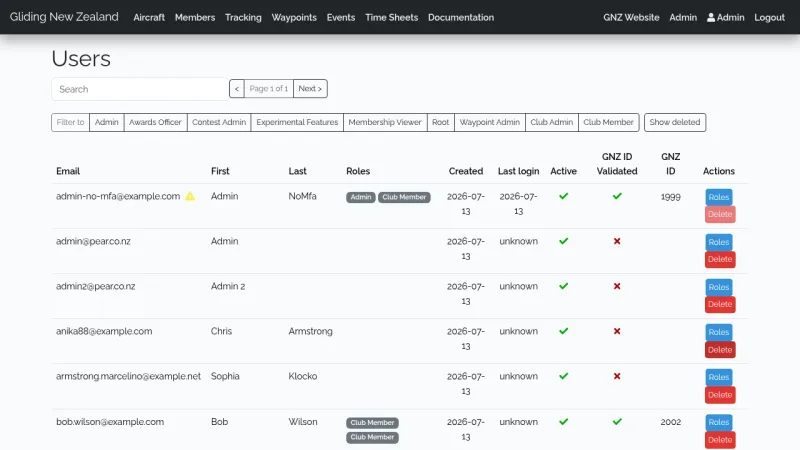
Go to Admin → Users. Each row now shows the person's roles, when their account was created, and their last login ("unknown" if they've never signed in).
A ⚠ warning icon next to the email marks a privileged account whose GNZ membership is no longer active — the main thing to look for when reviewing who still has access.
Step 2 — Remove the user
Click Delete on their row. A confirmation box asks for a reason (required — it's saved to the audit log).
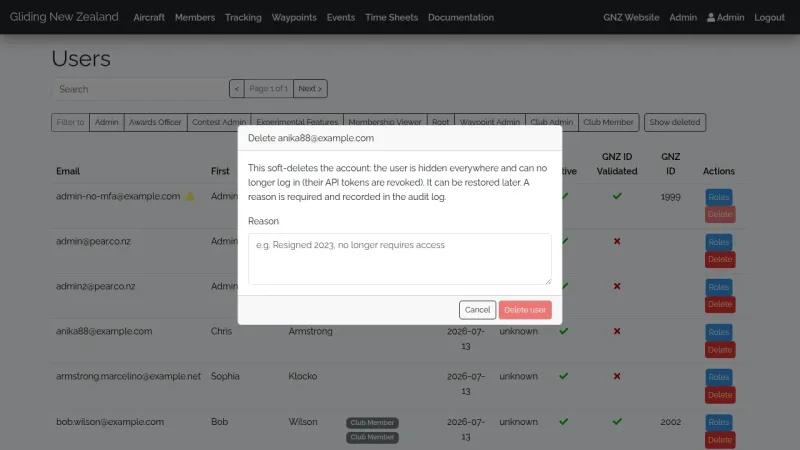
Enter the reason and click Delete user. Straight away:
- they can no longer sign in, and any app/API access they had is switched off;
- they disappear from the usual Users listing.
Step 3 — Find removed users again
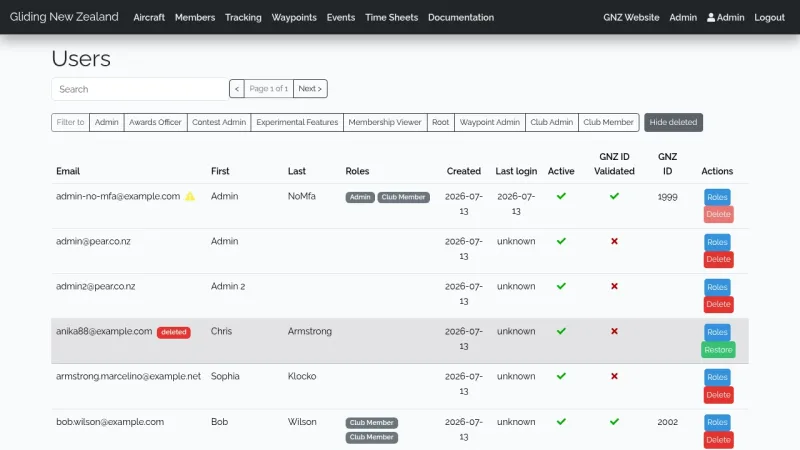
Click Show deleted to include removed accounts. They appear greyed out with a deleted badge; hover it to see who removed them, when, and why.
Step 4 — Restore, if needed
Click Restore on a removed row. The account comes back with its roles intact and reappears in the normal listing.
For security, the person will need to sign in again — any old app/API access from before they were removed stays switched off.
What's recorded
Both removing and restoring a user are written to the audit log with who did it, who it was done to, and (for removals) the reason. Removing a user is never automatic — it's always a deliberate action you take, and the reason is kept.